
OopBuy Warehouse: Decide What Is Ready Before Combining Items
A warehouse decision starts with the items actually received, not every product on your shortlist. Match each recorded item to its option and quantity, then separate unresolved questions from goods you are ready to include in a parcel. One finished check does not settle the whole selection.
Two items can need different next steps
Imagine a top whose measurement has been clarified and a pair of shoes whose selected size is still uncertain. Waiting for a useful answer about the shoes is a different issue from waiting for the top to arrive. Keep those states separate when deciding whether to combine them.
The black-and-silver shoe listing can identify a design candidate. It is not a record of your warehouse receipt or a source of packed dimensions. Use the actual order association to confirm which pair and option the warehouse entry concerns.
The order-status guide helps with receipt mismatches. For visible details or measurements, use the QC guide. A photograph may show a count of visible pieces, but it does not automatically prove that every item in a larger order is present.
Check storage timing before waiting for another purchase
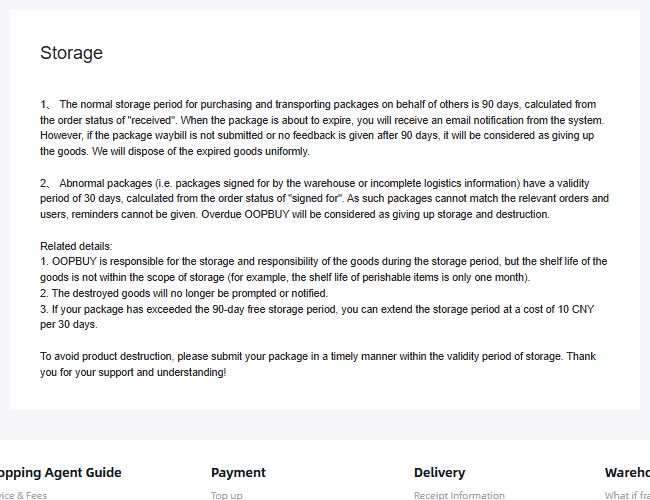
Policy view saved on 10 September 2026. It documents storage terms rather than the current contents or condition of a customer's parcel.
An OopBuy storage notice saved on 10 September 2026 described a normal 90-day period from received status and a 30-day period from signed-for status for problematic unmatched shipments. It also warned about disposal after expiry. These dated terms are not confirmation of the deadline or extension available for your current item; verify those before relying on further storage.
Do not assume that a later arrival restarts the period for earlier goods. If you are waiting for another item, compare the consequences of waiting with those of a separate shipment. Include relevant packing and transport costs rather than treating fewer parcels as an automatic saving.
Distinguish a planned parcel from a packed parcel
You can make a provisional plan that includes an item still on its way, but do not describe its weight and dimensions as measured packed data. Once the selected contents or packaging change, revisit the corresponding estimate. The shipping calculator guide explains how to keep the inputs comparable.
Ask what a requested packing change involves, whether it is available and what it costs. An instruction being acknowledged is not proof that the alteration is finished. Confirm the resulting parcel record before using it for the next decision.
Use confirmed receiving instructions, not a guessed address
If you intend to send something to a warehouse yourself, obtain the receiving instructions appropriate to that operation. A developer's business address, an old screenshot or another shopper's label is not a substitute. Ask support which destination and matching details apply, without borrowing somebody else's identifiers.
Do not post a full receiving or delivery label in a public group to ask a general question. Keep necessary originals private and remove personal identifiers from public images.
Make the selected contents explicit
Before the parcel step, identify the items that should travel and those that should stay. If you change your mind, clarify which earlier instruction is replaced. An item left out of the parcel should not later inherit that parcel's delivery status.
Return to the buying guide for the sequence or the OopBuy spreadsheet if you are still comparing products. Warehouse planning should follow resolved item choices, not turn uncertain candidates into an assumed shipment.